Latest Version
The Entangle Photo project
Design
Linux
Free
org.entangle_photo.Manager
Report a Problem
More About Entangle - Tethered Camera Control & Capture
Picture this: you are in the middle of a meticulous studio photoshoot, trying to capture the perfect macro shot or product layout, but you are constantly bending over to squint at your camera’s tiny three-inch LCD screen. Adjusting settings requires physical contact, which risks nudging your carefully aligned tripod. This is where Entangle tethered camera control steps in to transform your workflow, bringing the entire viewfinder experience directly to your Linux desktop.
What is Entangle Tethered Camera Control?
Developed by The Entangle Photo project, this specialized open-source software is designed specifically for Linux users who need a reliable, professional-grade interface for tethered photography. By connecting your digital camera to your computer via a standard USB cable, the application grants you complete command over your hardware without ever touching the camera body itself.
Key Features for Studio and Macro Photographers
The utility of this application goes far beyond simple file transfers. It integrates deeply with your camera's internal system to provide a seamless shooting experience:
- Remote Shutter Triggering: Fire your camera shutter directly from your keyboard or mouse, completely eliminating physical camera shake during critical exposures.
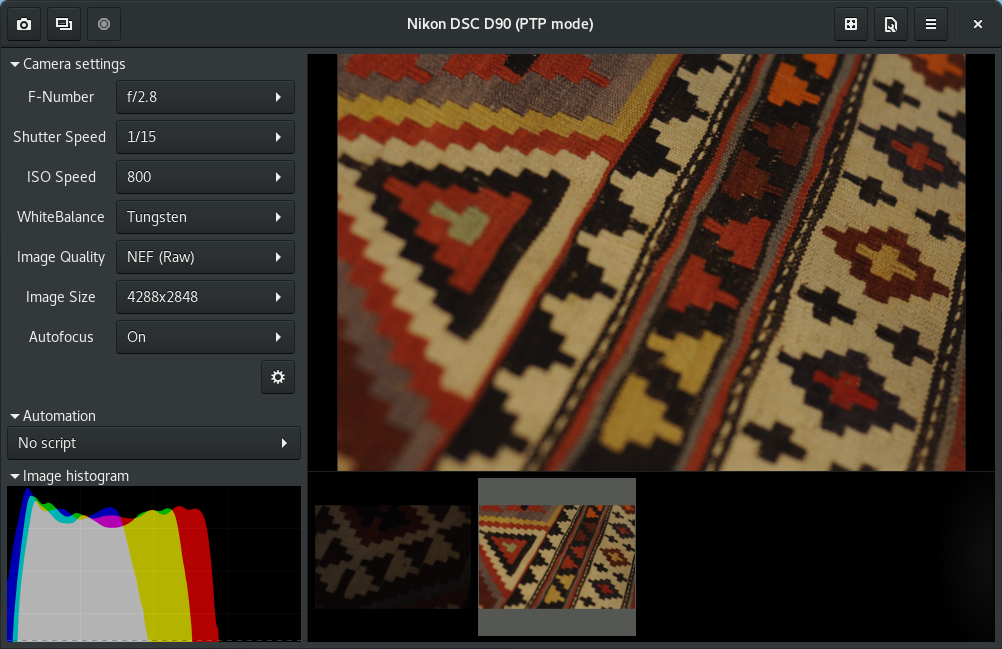
- Real-Time Live Preview: When supported by your specific camera model, you can view a continuously updating live preview of your scene on your computer monitor before you take the shot. This makes perfecting your focus and composition incredibly easy.
- Instant Image Display: As soon as the shutter clicks, the high-resolution image is automatically downloaded and rendered on your large screen, allowing you to inspect fine details immediately.
- Comprehensive Settings Management: Adjust aperture, shutter speed, ISO, and other vital camera parameters straight from the desktop interface.
Device Compatibility and Platform Support
Because compatibility is crucial for photographers, the software supports a wide array of hardware. It is highly compatible with most DSLR cameras from industry leaders like Nikon and Canon, along with select compact camera models and various devices from other manufacturers. Running natively on Linux, it provides a stable, resource-efficient environment for demanding creative tasks.
Is It Right For You?
If you are a portrait, product, macro, or stop-motion photographer working on a Linux system, having Entangle tethered camera control in your toolkit is a massive productivity booster. It bridges the gap between your camera and your computer, turning your workspace into a highly efficient digital studio.
To try this powerful tool for yourself, head over to the official Flathub repository to view the application and integrate it into your photography pipeline.
Rate the App
User Reviews
Popular Apps









Editor's Choice